TL;DR
NCCL 2.29.7 added native port failover. It moves traffic off a failed NIC port, but only onto other members of a group that NCCL fuses into one virtual NIC when the job starts. That group cannot change while the job runs. By default, except on Vera Rubin systems, a group holds only the ports of one physical NIC. On servers with one single-port NIC per GPU, such as NVIDIA DGX H100, H200 and B200, each group has one member, so a failed link has nowhere to go. Wider groups provide coverage but change how every message travels. After a member fails, the group runs at about half its normal rate. It cannot survive a second failure until the first member recovers, and recovery is off by default.
How native port failover works
NCCL, the NVIDIA Collective Communications Library, carries GPU-to-GPU traffic between servers. Its built-in InfiniBand and RoCE transport can fuse several NIC ports into one virtual NIC and split every message across them [7].
Native port failover builds on that fusion [8]. It is off by default and is turned on with NCCL_
Two facts shape everything that follows. The group sets every place traffic can go, because NCCL opens no new connections when a link fails [5]. And failover starts only when the NIC gives up retrying, about 30 seconds at default settings [7].
The group is fixed when the job starts
NCCL forms groups once per process, when its first communicator maps the server’s topology. The source says: “Virtual devices are only created once per network” [1]. Later communicators reuse those groups, and the built-in transport keeps them even after every communicator closes [6]. Changing a group means changing settings and restarting the processes.
|
Setting |
Default in 2.32.3 |
What it does |
|
NCCL_ |
PORT (PHB on Vera Rubin, new in 2.32.3) |
Fuses NICs within this PCIe distance of the group’s first NIC. PORT fuses only the ports of one physical NIC. |
|
NCCL_ |
Not set |
Names the groups, for example mlx5_ |
|
NCCL_ |
ALL (RAIL on Vera Rubin, new in 2.32.3) |
RAIL fuses only NICs assigned to the same rail. Named groups in NCCL_ |
|
NCCL_IB_MERGE_NICS |
1 |
0 turns fusion off. |
|
NCCL_ |
0 (off) |
1 turns native port failover on. |
|
NCCL_ |
0 (off) |
1 turns fail-back on. It works only with NCCL_ |
Three hard limits apply.
- In NCCL 2.32.3, a group holds at most four NIC ports. NCCL’s limit of eight applies only to external network plugins that use version 12 or later of its plugin interface [1, 6].
- All members must use the same link type, InfiniBand or Ethernet [3].
- A group cannot span NUMA (non-uniform memory access) domains, which usually means CPU sockets. Communicator setup fails with "Fusing NET devices from different NUMA domains is not supported" [1].
Single-port NIC servers get no coverage by default
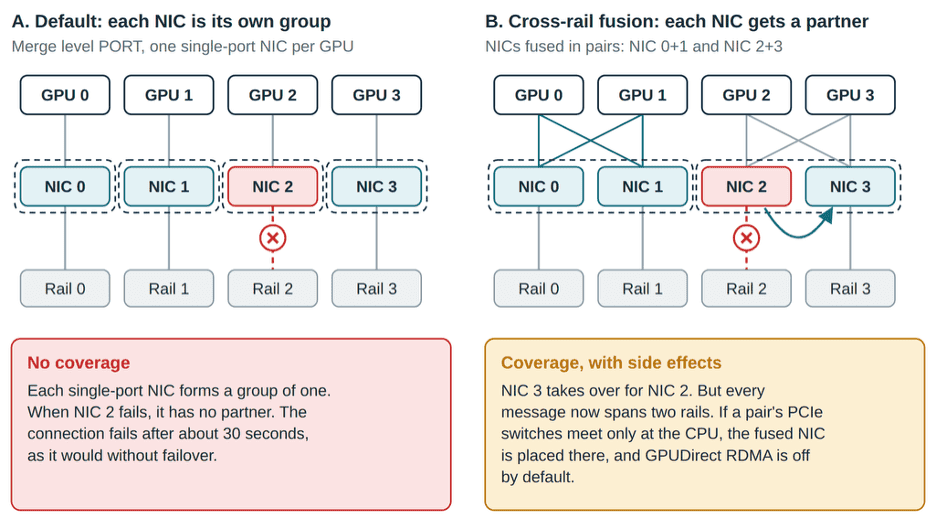
Figure 1. Default groups versus cross-rail fused NICs on a rail-optimized server (four of eight GPU–NIC pairs shown). Dashed outlines mark failover groups.
Many GPU servers give each GPU its own single-port NIC on its own rail. NVIDIA DGX H100, H200 and B200 systems use eight single-port ConnectX-7 NICs for the compute fabric [9]. At the default merge level, each of those NICs forms a group of one (Figure 1). With failover turned on, NCCL flags this exact case: “there is no other device to fail over to” [5]. A failed link then ends the connection, as it would without failover.
The RAIL policy does not help. It fuses only NICs on the same rail, and these servers have one NIC per rail. Coverage therefore requires fusing NICs from different rails. NVIDIA’s documentation warns that distance-based fusion “could inadvertently merge devices from different rails into a single virtual device,” and offers the RAIL policy to prevent it [7].
NCCL’s defaults point to a different design: NICs with several ports or planes on one rail. On Vera Rubin systems, NCCL 2.32.3 fuses same-rail devices within a CPU socket by default. There, a group’s members are planes of one rail, and native failover fits. NCCL treats a node as Vera Rubin when it has an Arm CPU and Rubin-class GPUs; x86 Rubin systems keep the PORT and ALL defaults. NCCL assigns rails and planes automatically only to ConnectX-9 NICs, and only when their count is a multiple of eight. Where no rails are assigned, automatically or in NCCL_IB_HCA, the RAIL policy fuses nothing [1, 3, 7]..
What cross-rail groups cost when nothing fails
Fusing NICs across rails gives each NIC a partner. It also changes the path of every message, all the time.
|
Cost |
What happens |
|
GPUDirect RDMA can turn off |
GPUDirect RDMA lets the NIC read and write GPU memory directly. NCCL places a fused NIC at the closest point its members share in the PCIe tree. If their PCIe switches meet only at the CPU, each GPU under that CPU reaches the fused NIC through the CPU’s host bridge (a PHB path). By default, NCCL does not use GPUDirect RDMA on PHB paths and stages data through host memory instead. Setting NCCL_ |
|
Every message spans rails |
NCCL splits each message equally across a group’s members, so each GPU’s traffic now uses two or more rails. A fused NIC whose members sit on different rails has no rail identity [3, 4, 7]. |
|
Every node must fuse the same way |
Queue pair i links member i mod n on one server to member i mod m on the other, where n and m are the two group sizes. With equal groups, member i pairs with member i. If a node groups or orders its NICs differently, for example after it starts with a NIC missing or a link down, members pair across rails. NCCL skips any port that is not active when the process starts [3].. In NVIDIA’s rail-aligned designs, traffic between rails crosses the spine layer. NCCL does not warn about this by default [1, 4, 10]. |
|
Named groups can block a job |
If a node lacks a NIC named in NCCL_ |
|
Connections and registrations grow |
Each connection opens at least one queue pair per member, and every buffer NCCL registers on the connection is registered with every member NIC [4].. |
What happens when a member fails
- One failed member at a time. While one member is out, including while it recovers, a second failure ends the connection. The source says: "No support for more than a single failed device." A larger group does not raise the limit. A member that has recovered counts as healthy again [5].
- About half rate, at any group size. All of the failed member’s queue pairs move to the next member’s queue pairs. That member then carries two shares while the others carry one (Figure 2). Bandwidth-bound collectives that use the group slow to its pace [4, 5].
- About 30 seconds to detect. Failover waits for the NIC to exhaust its retries: about 30 seconds at NCCL_IB_TIMEOUT=20 and NCCL_
IB_ RETRY_ CNT=7. Each side of a connection detects the failure on its own, when its own sends run out of retries. In NVIDIA’s analysis of a public bug report, the receiver detected the failure about a minute after the sender [11]. NCCL logs the NIC’s port-down event as a warning but does not act on it [4]. One NCCL_IB_TIMEOUT value applies to every reliable-connection queue pair in the process, so it cannot be tuned for one group or one NIC. NVIDIA notes that raising it can help large networks that hit retry errors, and the default has risen from 14 to 18 to 20. A lower value risks false alarms. Each one leaves the group with no spare until recovery succeeds, and without port recovery the loss is permanent [5, 7]. - Recovery is opt-in, and a failed attempt is final. Without port recovery, a failed member stays out for the life of the connection. With it, NCCL starts recovery 200 ms after the failure. It first resets the member’s probe and recovery queue pairs and gives up if that fails. It then runs a handshake with the remote side, allowing up to 20 timeouts of 4 to 5 seconds each; some errors end it sooner. If recovery fails, the member stays out for the life of the connection: "Device %d will not be attempted to be recovered any more" [5]. A public bug report shows fail-back failing on RoCE in NCCL 2.30; it is open as of September 2026 [11].
- Fatal NIC errors are not covered. Native failover handles one failure type: a send that runs out of retries. When the NIC driver reports a fatal device, queue-pair or completion-queue error, NCCL ends the connection with an error, whether or not failover is on (NCCL_
IB_ RETURN_ ASYNC_ EVENTS=1, the default). Fusion does not change this: a NIC that reports a fatal error, as after a firmware crash, still ends the connection [4].
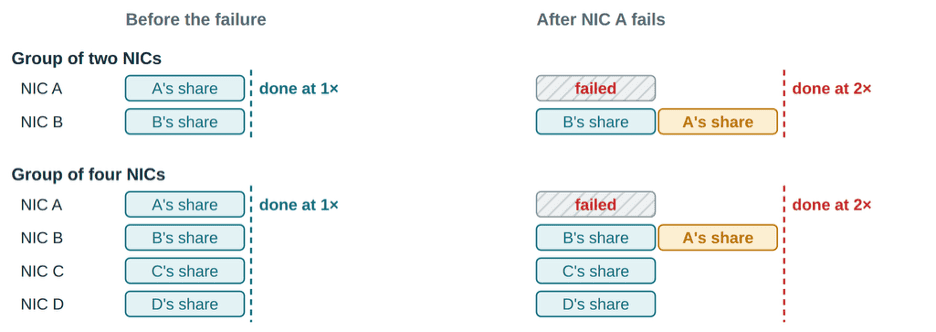
Figure 2. The failed member’s whole share moves to one surviving member, and NCCL does not recompute the split. A large transfer over equal-speed members finishes when its last share lands, so it takes about twice as long with two members or four.
LinkPass comparison
Native failover runs only in NCCL’s built-in InfiniBand and RoCE transport. LinkPass is an external NCCL network plugin that NCCL loads in place of that transport, so the two are alternatives, not layers.
|
|
NCCL native port failover |
Clockwork LinkPass |
|
Where backups come from |
Other members of a fused NIC, fixed when the job starts |
NIC pairs chosen when a link fails. Each pair must pass a rail rule, a health probe and a distance limit. |
|
Normal traffic |
Fusion splits every message across members and, on PCIe-attached servers, can turn off GPUDirect RDMA |
No fusion needed. NCCL’s usual NIC choice stays in place. |
|
Detection |
NIC retries run out: about 30 s at defaults |
A completion timeout, 1 s by default, or a NIC error |
|
Failures tolerated |
One failed member at a time |
Continues while a compatible, healthy NIC pair remains |
|
Failure performance impact |
The fused NIC runs at about half rate, whatever the group size. The failed member’s whole share lands on one survivor, and NCCL does not re-split it. (Derived from the public source code). Because the collective is bottlenecked by the affected network traffic, the 50% throughput reduction slows the entire collective to approximately half its previous rate, affecting all participating workers. |
Moves the failed NIC’s connections to healthy NIC pairs that pass its rail and distance rules, so the traffic can spread over several NICs. The best case keeps (N−1)/N of the bandwidth. |
|
Memory registration |
Every buffer on every member, all the time |
On the backup NIC, when failover starts |
|
Fail-back |
Optional and off by default. NCCL retries the handshake up to 20 times. If recovery fails, the member stays out for the life of the connection. |
Re-tests the original path every second by default, then moves traffic back |
|
Changing the setup |
New settings and a job restart |
No failover groups to configure |
References
- NVIDIA, NCCL source, src/graph/topo.cc, tag v2.32.3-1. https://github.com/
NVIDIA/ nccl/ blob/ v2.32.3-1/ src/ graph/ topo.cc - NVIDIA, NCCL source, src/graph/paths.cc, tag v2.32.3-1. https://github.com/
NVIDIA/ nccl/ blob/ v2.32.3-1/ src/ graph/ paths.cc - NVIDIA, NCCL source, src/
transport/ net_ ib/ init.cc, tag v2.32.3-1. https://github.com/ NVIDIA/ nccl/ blob/ v2.32.3-1/ src/ transport/ net_ ib/ init.cc - NVIDIA, NCCL source, src/
transport/ net_ ib/ connect.cc, p2p.cc, reg.cc, common.cc and common.h, tag v2.32.3-1. https://github.com/ NVIDIA/ nccl/ tree/ v2.32.3-1/ src/ transport/ net_ ib - NVIDIA, NCCL source, src/
transport/ net_ ib/ p2p_ resiliency.cc and p2p_ resiliency_ recovery.cc, tag v2.32.3-1. https://github.com/ NVIDIA/ nccl/ blob/ v2.32.3-1/ src/ transport/ net_ ib/ p2p_ resiliency.cc - NVIDIA, NCCL source, src/plugin/net.cc, tag v2.32.3-1. https://github.com/
NVIDIA/ nccl/ blob/ v2.32.3-1/ src/ plugin/ net.cc - NVIDIA, NCCL Environment Variables, docs/
userguide/ source/ env.rst, tag v2.32.3-1. https://github.com/ NVIDIA/ (published at https://docs.nvidia.com/nccl/ blob/ v2.32.3-1/ docs/ userguide/ source/ env.rst deeplearning/ , which can lag a release)nccl/ user-guide/ docs/ env.html - NVIDIA, NCCL release notes for 2.29.7 (port failover) and 2.30.3 (port recovery). https://github.com/
NVIDIA/ nccl/ releases - NVIDIA, DGX H100/H200 User Guide, introduction chapter, https://docs.nvidia.com/
dgx/ ; DGX B200 User Guide, introduction chapter, https://docs.nvidia.com/dgxh100-user-guide/ introduction-to-dgxh100.html dgx/ dgxb200-user-guide/ introduction-to-dgxb200.html - NVIDIA, DGX SuperPOD Reference Architecture featuring DGX B200, "Network Fabrics." https://docs.nvidia.com/
dgx-superpod/ reference-architecture-scalable-infrastructure-b200/ latest/ network-fabrics.html - NVIDIA/nccl issue #2157, opened May 2026, with NVIDIA’s analysis in the comments. https://github.com/
NVIDIA/ nccl/ issues/ 2157