LinkPass keeps training, inference and reinforcement learning running through NIC and link failures.
TL;DR A single flapping link between a GPU server and its leaf switch can stall every GPU in a job, and a longer outage can cause the job to fail. LinkPass, Clockwork’s network plugin for NCCL (the NVIDIA Collective Communications Library), keeps the job running by moving the traffic to alternative NICs in the same server. It deploys like any standard NCCL network plugin – an environment variable with no changes to application code.
One link blinks. Every GPU waits.
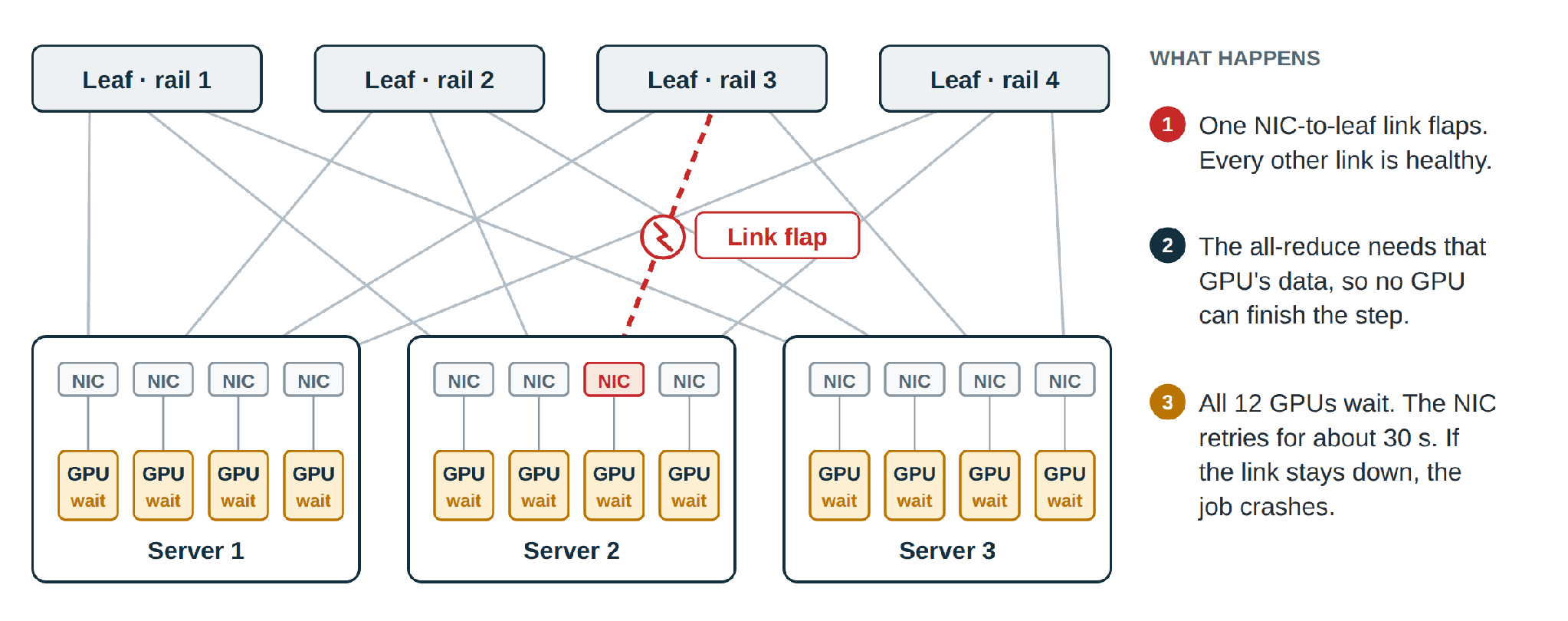
Picture a 512-GPU training job, hours into its run. On one server, the optic on one NIC starts to flap, then goes dark. Every GPU in the job is healthy, yet every GPU in the job stalls.
AI workloads move data in collective operations, and a collective is only as fast as its slowest transfer. In an all-reduce, each GPU needs every other GPU’s contribution, so one stalled link idles the whole group within a step. At NCCL’s default settings, the NIC keeps retrying for about 30 seconds. A link that comes back in time costs a stall. A link that does not, costs the entire job, which restarts from its last checkpoint.
Link failures are routine, not rare. A large cluster has tens of thousands of server-to-switch links, and each one has multiple parts that can fail: NIC ports, optics, cables and switch ports. In Alibaba’s production training clusters, NIC errors cause 9.1% of failures and optic or fiber errors another 6.7% [1].
Training, inference and reinforcement learning (RL) are all exposed. Training waits on gradient all-reduces and parameter all-gathers, multi-node inference waits on the cross-node exchanges behind every generated token, whether the model is split by tensor, pipeline or expert parallelism. RL waits on both, plus the broadcast that ships new policy weights to its rollout engines.
Without LInkPass: Wait longer, add hardware or start over
Existing remedies for edge-link failures helps, but don’t adequately close the gap.
|
Approach |
What it does well |
What it leaves open |
|
Longer transport timeouts |
It rides out short flaps without an error. |
The job stalls for the duration of shorter flaps. It does not fix longer flaps or failures and prolongs their detection. |
|
Multi-planar fabrics |
It gives each NIC more than one path into the fabric. |
It costs switch ports and optics; failover is per plane and a failed link can cost that NIC half its bandwidth with two planes, or a quarter with four. |
|
NCCL native port failover (release 2.29.7 and later; NCCL behavior as of release 2.32.3.) |
It resends lost data over another port in a NIC group fixed at start-up. |
It waits for the transport to report an error (30 seconds at default settings). Its group is fixed at start-up and, by default, holds only the ports of one NIC, so single-port NICs get no failover. A second failed device in the group is fatal. With two ports in the group, failover penalty is 50%. |
|
Fault-tolerant NCCL forks (VCCL, R²CCL) |
They build recovery into the collective library. |
They replace NCCL, which requires qualifying a build with every NCCL release. |
|
Checkpoint and restart |
It recovers from any failure. |
It loses the work since the last checkpoint, plus minutes to sometimes hours to detect the failure, reprovision healthy resources, restart the job and restore the checkpoint. |
LinkPass fills that gap as a NCCL network plugin, taking the place of NCCL’s built-in IfiniBand transport. It acts as soon as a link stalls, instead of waiting for the native transport to report an error, and it can fail over to the other healthy NICs in the server. It coordinates both ends of the connection so no data is lost or delivered twice.
How LinkPass keeps the job alive
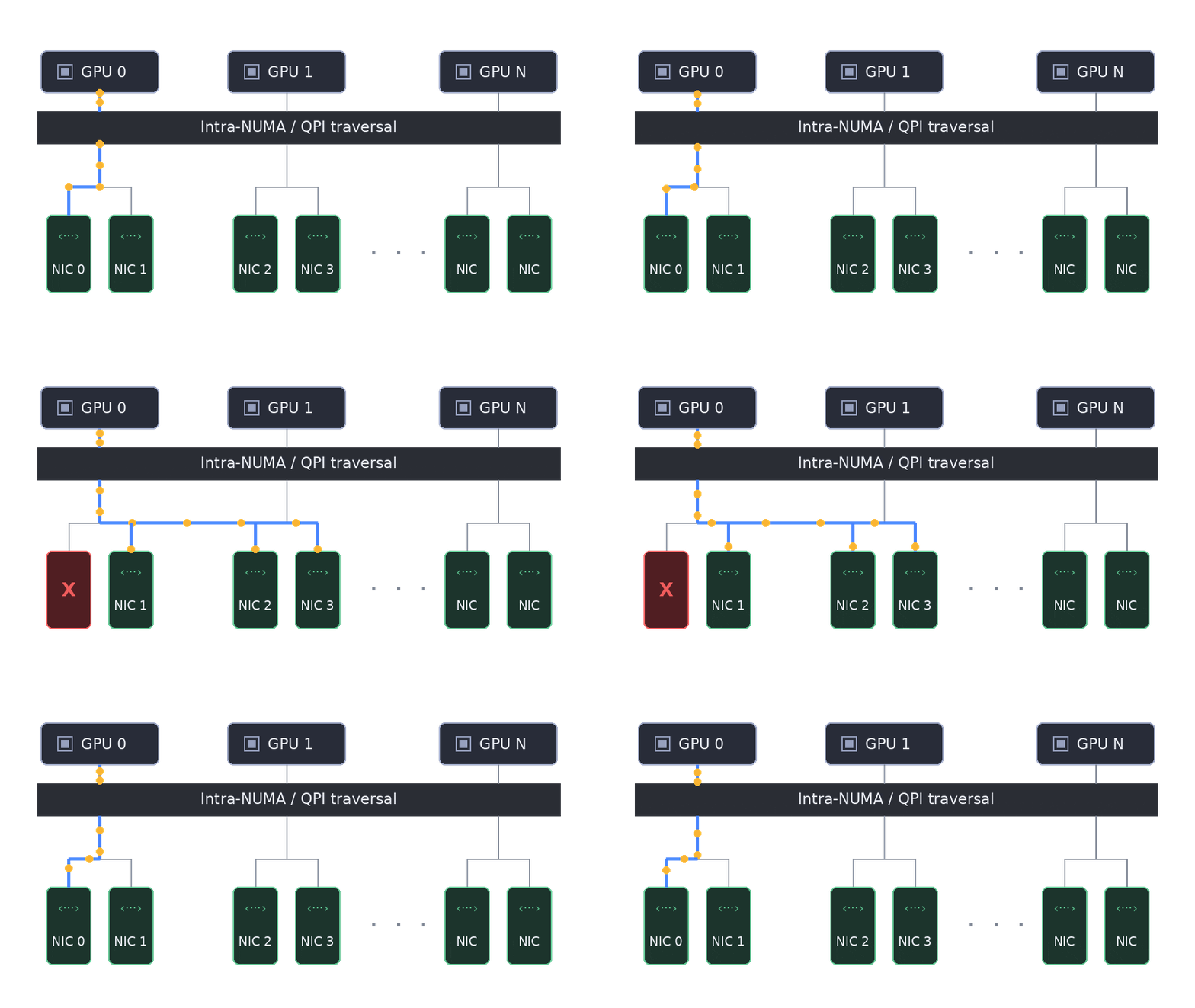
LinkPass is implemented as a NCCL network plug-in that uses NCCL’s ncclNet interface and drives the same NICs with the same standard InfiniBand Verbs on both InfiniBand and RoCE fabrics. When a link fails, it recovers in four steps, and NCCL never blocks while this happens.
- Detect. LinkPass monitors every connection and raises a fault for a stall longer than a configurable threshold (one second by default), or an error from the NIC. On-demand probes then confirm the fault and find healthy backup NICs.
- Agree. The two ends of the broken connection coordinate over a separate TCP control channel. They reset and drain the old connection, so nothing from the failed path can surface later. Then they resend only the transfers that both sides still hold incomplete.
- Continue. Traffic resumes on new connections across one or more healthy NICs, nearest first. The job keeps its NCCL communicator, so there is no restart, no reload and no lost step. It runs at reduced bandwidth until the link returns.
- Fail back. LinkPass re-tests the original path every second by default. When the path passes, the same coordinated handoff moves the traffic back, and full bandwidth returns.
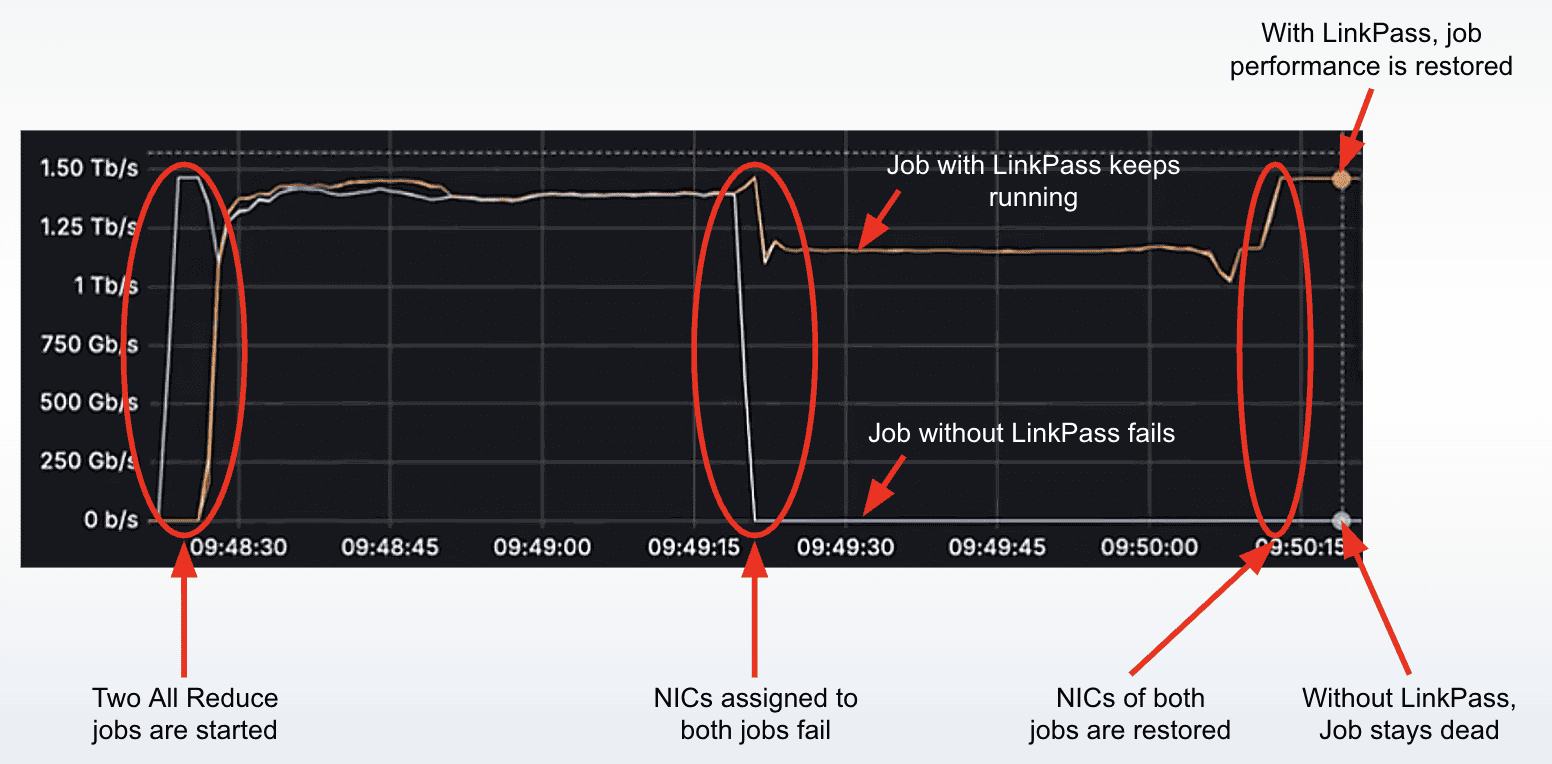
The attached picture illustrates the impact of LinkPass. Without Clockwork (Run 2), the job dies at the failure and stays dead after the NIC returns, because the job has already crashed. With Clockwork (Run 3), the job keeps running at lower throughput (~15% of network bandwidth; ~5-10% lower job throughput).
The business case is simple arithmetic. One job-ending failure on a 512-GPU job, with a two-hour checkpoint interval and an hour to detect it and restart from a checkpoint costs about 1,000 GPU-hours. Across a 1,000-GPU training cluster, our white paper models $115,000 to $781,000 a year in lost computation, stalled time and incident labor. The cable still needs fixing. With LinkPass, the fix becomes a scheduled repair instead of an emergency.
Deploys like any NCCL network plugin
NCCL was built to be extended at the network layer. At start-up it loads the plugin library named by the NCCL_NET_PLUGIN environment variable, libnccl-net-<name>.so, or libnccl-net.so if no name is given. If it finds neither, it falls back to its built-in InfiniBand implementation. Cloud providers ship their fabrics this way: the AWS plugin for its Elastic Fabric Adapter and Google Cloud’s gIB plugin are two examples. LinkPass deploys the same way, in three steps.
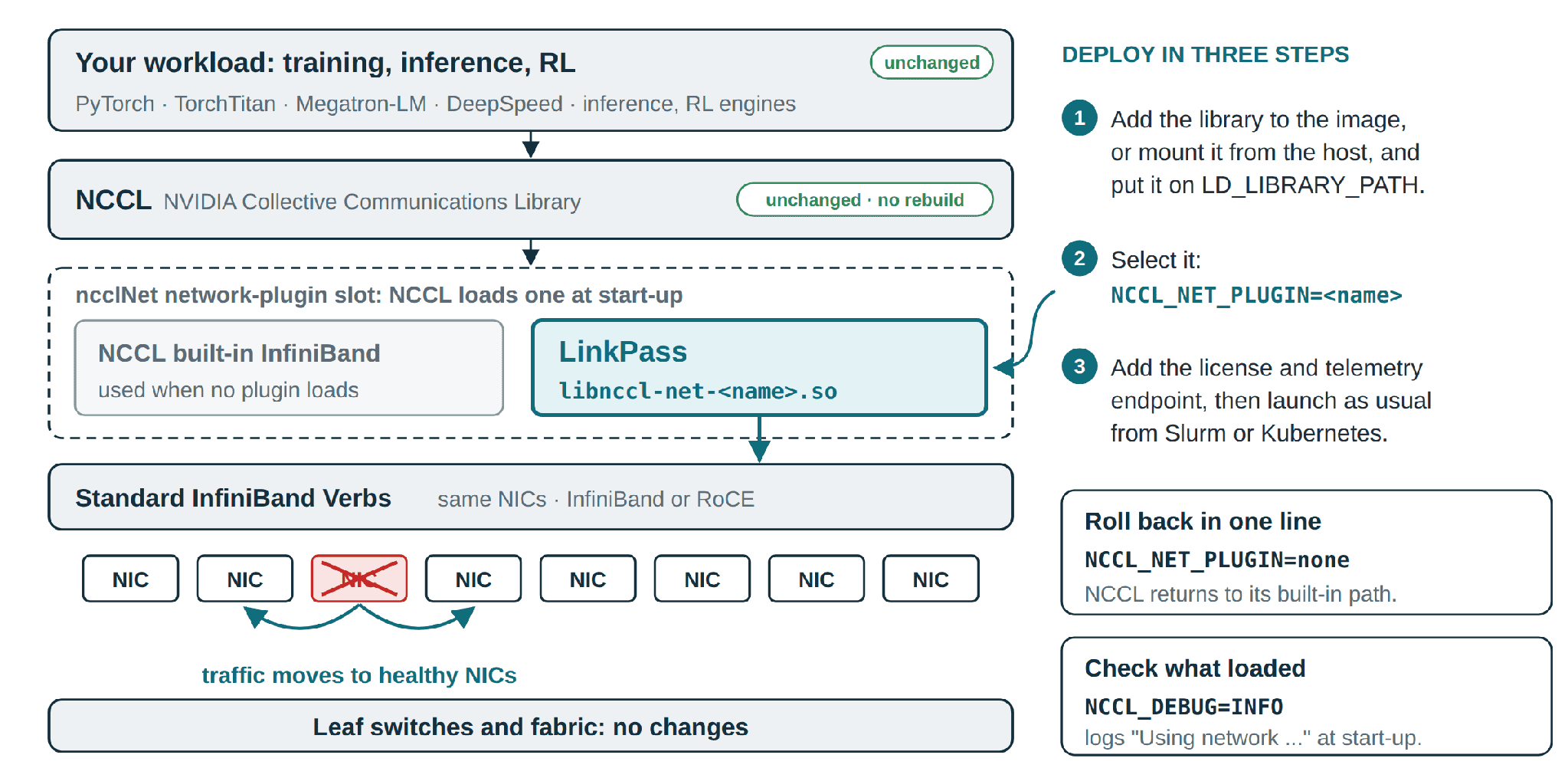
- Make the library visible to the job. Bake it into the training container image, or mount it from the host or an init container, and add its directory to LD_LIBRARY_PATH.
- Select it by setting NCCL_NET_PLUGIN. Set NCCL_NET as well if you want a job to fail at start-up, rather than run unprotected, when the plugin cannot load.
- Provide the license file and, for telemetry, the monitoring endpoint. Then launch the job as usual, from Slurm, Kubernetes or a script.
Nothing else changes: no application code, no framework changes, no NCCL rebuild and no switch configuration. Installation takes under a minute. Rolling back is one line, NCCL_NET_PLUGIN=none, and NCCL returns to its built-in implementation.