Shruti Verma, Software Engineer, Clockwork Systems
Yi-Ting Wu, Software Engineer, Clockwork Systems
Background
When distributed training jobs slow down or crash, it is often incredibly difficult to pinpoint why. This is largely because higher-level libraries, such as PyTorch, perpetuate an abstraction that makes it seem like all GPUs participating in a job move in lockstep. In reality, though, there can be a great deal of variance in how, when, and even where each rank completes its allotted work. Accordingly, if one or a few ranks begin to misbehave, debugging from a birds eye vantage point in the training stack proves futile.
Here at Clockwork, we were struck by the realization that localized issues, albeit leading to job-wide performance problems, require localized and granular visibility. This led us to the NCCL profiler interface and NVIDIA’s NCCL Inspector plugin, which we found to be incredibly useful.
In this blog, we’ll provide an overview of this utility and share our experience customizing and leveraging it. If you are new to NCCL itself, we recommend reading the Overview of NCCL first. For the rest of this post, we will assume you are familiar with ranks, communicators, and common NCCL operations such as AllReduce. We hope that the lessons we present here, whether by way of documentation review or anecdote, will help guide you along your own observability journey!
What is a NCCL Profiler Plugin?
Starting in NCCL 2.23, Nvidia introduced a profiler plugin interface that provides visibility into the lifecycle of NCCL communication operations. The operating principle here is simple– NCCL knows precisely when important events occur, so it is well-positioned to explicitly report on said events to a ‘profiler.’
There are three pieces involved:
- NCCL core owns the instrumentation points. It knows when a collective is enqueued, when its GPU work starts, and when different parts of that work complete.
- The profiler framework captures those timestamps and turns them into structured events.
- The profiler plugin receives those events through a callback interface and decides what to do with them — store them, aggregate them, write them to files, or send them somewhere else.
Since everything lives in the NCCL layer, users don’t have to modify their training application. A profiler implementation is built as a shared library file, and NCCL dynamically loads it at runtime.
At a high-level, the plugin is answering a fairly intuitive question – “What NCCL communication is happening right now, and how is it performing?” Instead of a sea of anonymous GPU activity, we can look right into a one-second window of a job and see what it is in the training workload that we actually care about – “10 AllReduce operations, each with a 1 MB message size, averaging 61.97 ms of execution time and 485 GB/s of bus bandwidth.”
What do the profiler plugin APIs Look Like?
Despite everything happening inside NCCL, the interface exposed to a profiler plugin is relatively small. At a high level, the plugin implements five callbacks:
- init()
- startEvent()
- stopEvent()
- recordEventState()
- finalize()
As it turns out, understanding these interfaces helps in understanding the lifecycle of a NCCL collective.
When a communicator is created, NCCL calls into the profiler plugin’s init() function so that it can set up per-communicator state. When an AllReduce starts, NCCL invokes startEvent() and gives the plugin rich context, such as the collective type, sequence number, message size, algorithm, protocol, and number of channels.
One subtle part is stopEvent(). We quickly learned that due to NCCL’s asynchronous nature, stopEvent() for a collective means that NCCL has finished enqueueing it, not that the GPU has finished executing it. Therefore, the plugin needs to track lower-level kernel-channel events associated with each collective. These indicate when the GPU-side work starts and finishes, allowing us to determine the collective’s actual execution time.
recordEventState() provides additional updates while an event is running, such as fine-grained kernel timing information. Finally, finalize() lets the plugin flush remaining data and clean up when the communicator is destroyed.
So while the API is only a handful of callbacks, together they let a plugin connect the high-level NCCL operation with the GPU work carried out through the event’s lifetime.
What is the NCCL Inspector?
NVIDIA’s NCCL Inspector Plugin is an open-source implementation of this profiler interface. Its job is simple: take NCCL’s internal profiling events and turn them into useful communication performance records. For example, rather than reporting only that a GPU kernel ran for roughly 62 milliseconds, Inspector can produce a record similar to:
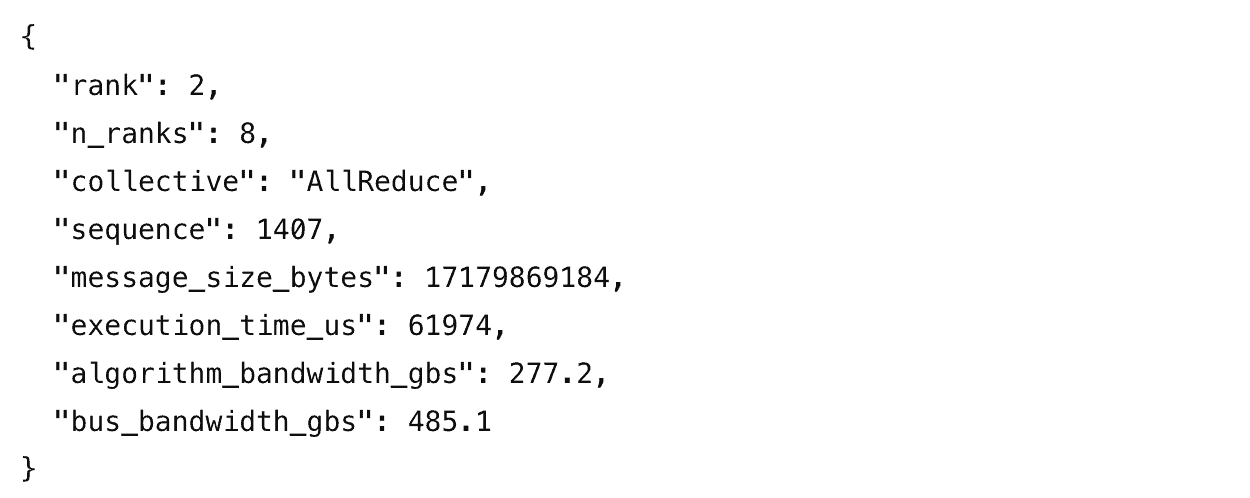
Now, the 62 ms measurement has context. We know that it came from an AllReduce. We know which sequence number it was, how large the message was, which rank reported it, and how much bandwidth NCCL achieved.
The real Inspector output contains additional communicator and process metadata, such as the host name, rank information, and the number of ranks participating in the communicator. Inspector can write these records as JSON and can also expose aggregated metrics in formats such as Prometheus. This makes Inspector useful both for one-off debugging and as a starting point for continuous NCCL observability.
How we customized the profiler plugin
NVIDIA’s Inspector Plugin gave us a solid foundation for collecting workload communication metrics. As we started using the data to investigate issues in more detail, however, we found that we needed additional visibility in a few areas.
First, the Inspector Plugin reports only the latest completed collective in each monitoring interval. Communication can be bursty, and looking at a single completed operation can hide both short-lived changes and the broader distribution of collective behavior. We therefore extended our profiler plugin to track all completed collectives as well as operations that are still in flight. From there, we can summarize the raw events over different time windows.
Second, duration and bandwidth tell us how long an operation took, but not precisely when it happened. That distinction became important when we wanted to compare communication across ranks. We added absolute start and end timestamps to each event and combined them with Clockwork’s clock synchronization technology to align operations across machines. This gave us a much clearer view of how the same phase of communication unfolded across ranks.
Finally, Inspector supports standard outputs such as JSON and Prometheus-formatted metrics, but we wanted to use NCCL telemetry together with the rest of our workload signals. We therefore extended the plugin to stream event records directly to our monitoring service, where they can feed higher-level detection logic.
These customizations turned the profiler plugin from a source of individual NCCL metrics into a richer observability layer for distributed workloads. In the next section, we’ll look at how we use that communication context and timing information to reason about differences across a large distributed job.
Why is the plugin useful?
Let’s take a look at an example, starting with a vanilla FSDP job run over 16 H100 GPUs. Recall that from the profiler plugin data, we have access to all NCCL operations that a rank participates in, each tagged with important metadata– the collective type, sequence number, kernel enqueue time, kernel start time, and kernel end time. Accordingly, so long as all participating nodes have their clocks synchronized (for this we use Clockwork’s ClockSync, which synchronizes clocks to sub-microsecond accuracy entirely in software), we can plot each GPU’s progress relative to one another. In the graph below, each column represents a collective type. Each plot represents the time difference between when a rank enqueued (row one), started (row two), or completed (row three) a particular collective number compared to the earliest of its peers to perform that action.
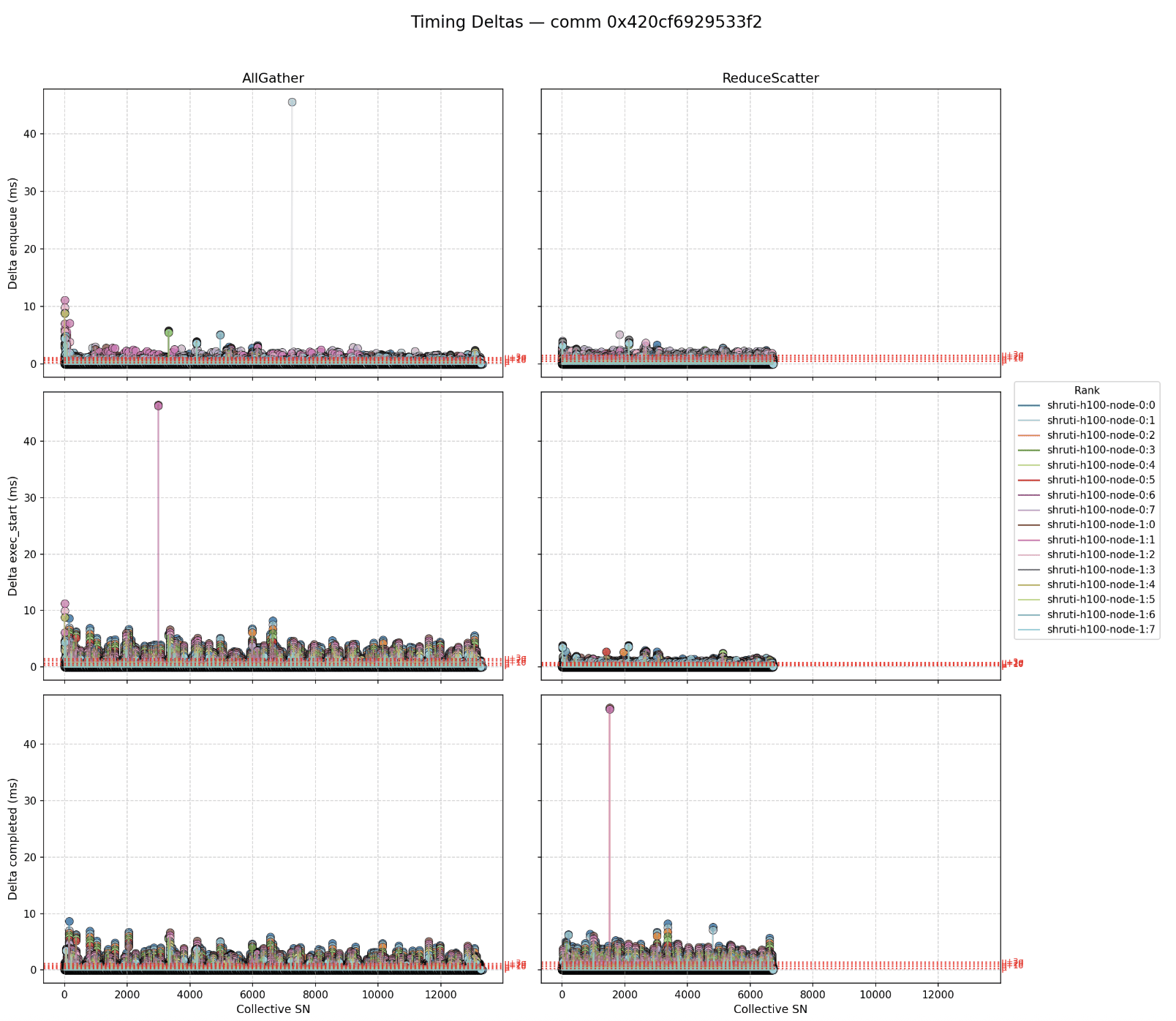
Notably, since the ranks are not in complete and perfect lockstep with one another, the timing delta values (and thus the dots in the above plot) are non-zero. Still, neither these raw deltas, nor the variance between ranks is particularly large. Furthermore, the pattern looks relatively consistent across the job run. This indicates that each rank finishes its computation work and approaches information exchange boundaries at roughly the same time. This serves as evidence that, from a compute perspective, the system is running relatively smoothly.
In contrast, let’s now consider a run where something went wrong. In this case, the job runner noticed midway through the job that progress had begun to slow. All PyTorch indicates is that iteration times have increased, but there’s no indication as to why. The profiler plugin, though, immediately illuminates the issue.
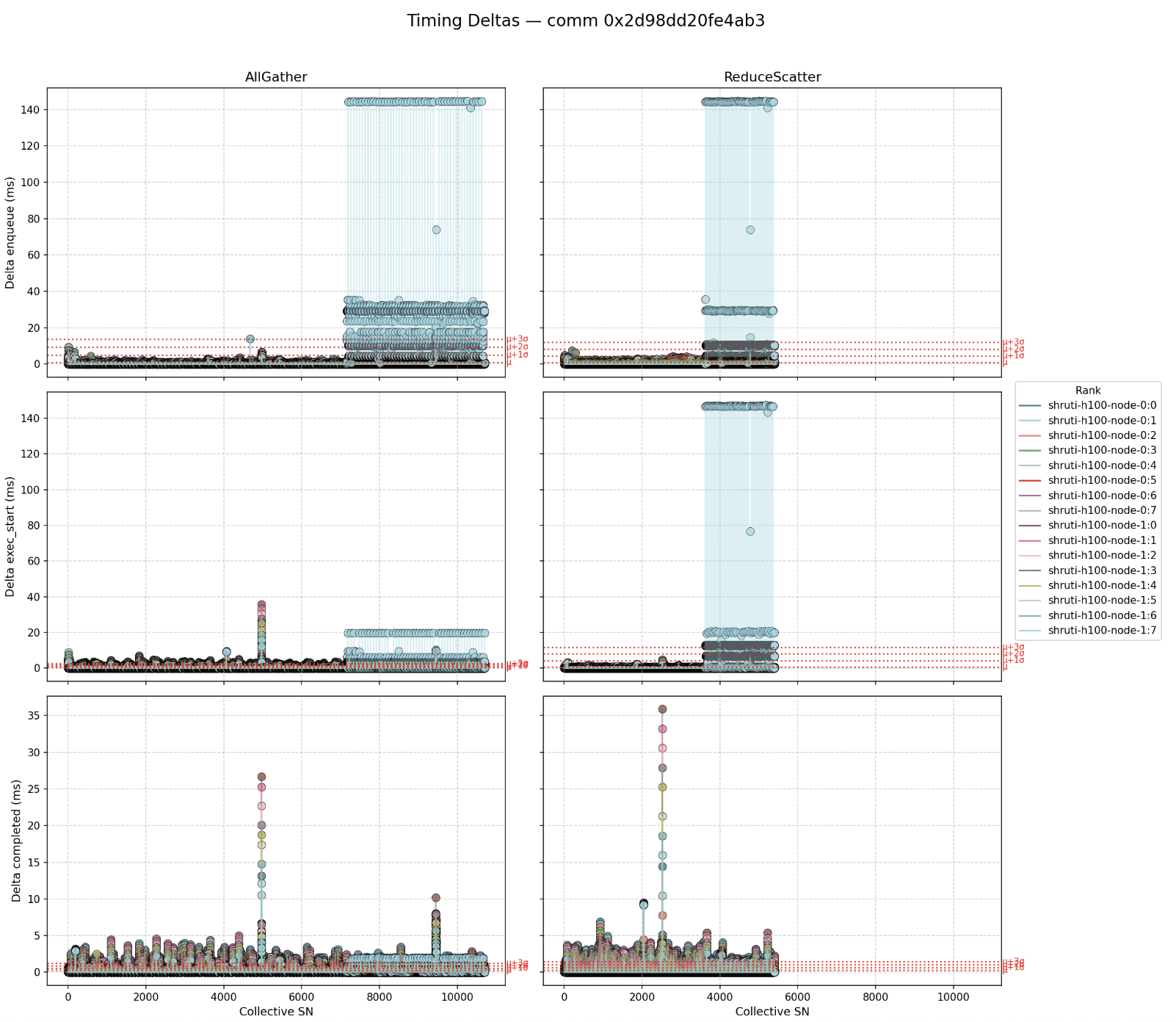
Above, we see that halfway through the job, one rank begins executing its collectives far later than its peer ranks. This is a telltale symptom that a GPU has started to run slower than its peers. One of the most common reasons for a slow GPU is overheating. When its temperature rises too high too fast, a GPU will throttle its clocks in an effort to cool down. This decreases its processing speed and, as a result, the rank begins to slow down the whole job. Canonically, such a rank is known as a “straggler.” Having identified this bad GPU, the job runner can schedule it to be serviced and exclude it from future job runs until then, potentially saving countless GPU hours wasted on jobs running slower than need be. Or, we can even live migrate it to another GPU using Clockwork TorchPass!
In this way, the profiler plugin’s granular, rank-level insight can be used to pinpoint the root cause of critical and otherwise opaque performance bottlenecks. Of course, it’s not always as simple as above. When workloads become more complicated (e.g. more complex parallelism modes), so do the communication patterns between ranks. Here at Clockwork, we’ve developed our own implementation of the profiler plugin which transmits fine-grained telemetry about running jobs to our monitoring service. There, we run a novel, online straggler detection algorithm which derives a number of metrics and insights from the received measurements in order to distinguish between expected and abnormal variance between ranks. We also use these measurements to flag GPUs that have in fact stalled altogether and which will imminently cause the job to crash. These “hung ranks” are another notoriously difficult class of problems to pinpoint in post-mortem debugging sessions. Fine-grained telemetry makes them lucid.
In summary, the NCCL Profiler Plugin provides visibility into an incredibly complex system, and visibility is a prerequisite for effective debugging and control. Reach out if you’re interested to learn more about our solution, if you have any questions about the plugin, or if you’d like to share about your experience with the tool! Happy profiling!
Related Links / Blogs: